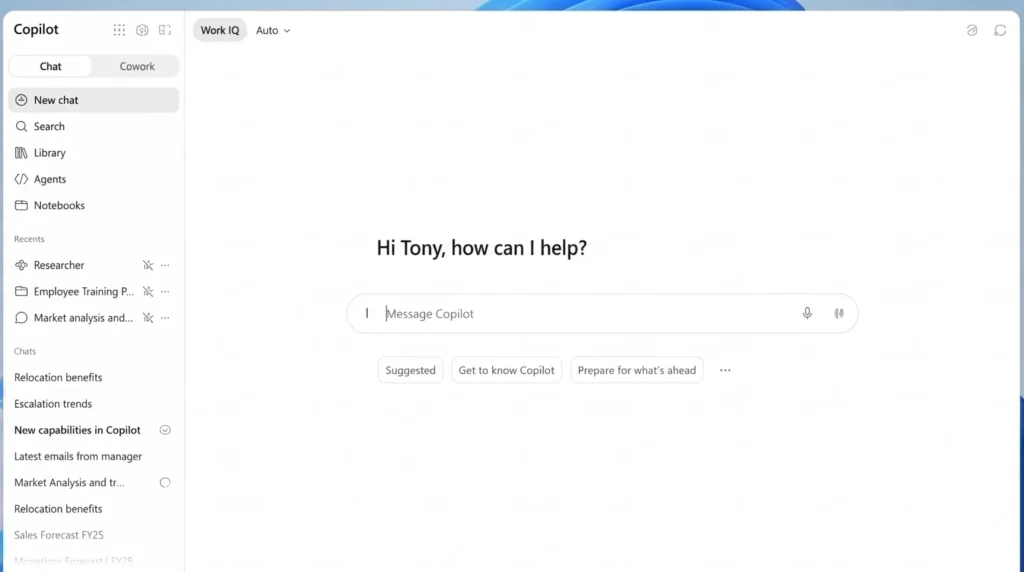
Starting tomorrow, the Copilot app you and your team use is changing shape. Microsoft is merging its consumer Copilot app and the Microsoft 365 Copilot app into one single experience, and the rollout begins on 18 August.
If you’ve ever wondered why your business account and your personal account behaved so differently inside Copilot, that gap is about to close.
I want to walk you through what’s actually happening here, because there’s a fair bit of noise online right now and not all of it is accurate. Some of this change is genuinely useful. Some of it means you’ll lose access to things you might be using today, and a few small pieces need your attention this week, not next month.
Why Microsoft Is Doing This
Microsoft built Copilot in two directions at once. There was the consumer chatbot people used at home, and there was the work-focused version tied into Microsoft 365 Copilot licensing, your files, your mail and your meetings. Two apps, two experiences, and plenty of confusion for anyone who used both on the same laptop.
From 18 August, that split starts to disappear. One Copilot app will accept both personal Microsoft accounts and work or school accounts, with a switcher inside the app so you can move between the two.
The web address is changing too, from m365.cloud.microsoft to copilot.cloud.microsoft, and you’ll be redirected automatically unless your business has blocked that.
It’s not happening everywhere at once. Microsoft is rolling this out in waves, starting with mobile and web, and moving to Windows and Mac desktop apps from mid-September. So don’t be surprised if your update lands a different week to someone else’s.
What You’ll Actually Notice
The most visible change is that one app now does both jobs. If you’re signed into your work account, you’ll see a “Work” label and a different background colour, so it’s clear which identity you’re using.
Microsoft says the security, compliance and privacy controls for your business data stay exactly as they are, they’re not merging your work and personal worlds, just putting them behind one door.
You’ll also get more of Microsoft 365 inside Copilot itself. Word, Excel, Outlook and OneDrive become accessible directly from the app for eligible work accounts, so people can ask Copilot to pull up a file or check an email without switching windows.
That’s a genuine convenience, but it also means more of your business data is reachable from a single AI front door, which is worth keeping in mind when you’re thinking through access and permissions.
What’s Being Retired, and Why It Matters
This is the part that needs your attention before Wednesday, not after.
Group Chat is going. If your team has used Copilot’s shared group conversations to brainstorm or plan together, you won’t be able to start or join new ones once your account updates. Existing group chats will turn into individual chats with Copilot, and here’s the catch: your own messages and files stay, but anything shared by other people in that chat, images, documents, ideas, won’t carry across. If there’s something useful buried in a group chat right now, copy it out today.
Podcasts are gone, full stop. Microsoft has confirmed there’s no way to export a Copilot-generated podcast, and once your account updates you won’t be able to create new ones or access old ones. If anyone on your team has been using this for internal briefings or summaries, download what matters before the change lands.
Deep Research is being retired for consumer accounts. If you’re on Microsoft 365 Premium, you’re covered, a tool called Researcher takes its place and does much the same job. Personal and Family subscribers will still be able to see past research in their chat history, but won’t be able to create new reports through this feature.
Copilot Labs is closing too. This was Microsoft’s testing ground for early features, and anything you built or saved there, including 3D assets or audio clips, needs saving locally before your account updates. There’s no automatic carryover.
One smaller detail worth mentioning: Mico, the animated character in Copilot Voice, is moving over to Learn Live instead. Voice itself isn’t disappearing, you’ll just be talking to Copilot without the little animated face doing the talking back.
Why This Isn’t Just a Consumer Story
I get why some business leaders might read this and think it’s a personal Copilot problem, not a work one. It’s worth looking twice though.
A lot of your staff use their personal Microsoft account on the same laptop they use for work, whether that’s checking a family calendar at lunch or using ChatGPT-style tools out of habit. Once personal and work Copilot sit inside the same app, the line between the two gets thinner, even if the underlying security controls haven’t changed.
That makes it more important than ever to know exactly which apps are allowed on managed devices and how your conditional access policies treat that switch between identities.
There’s also a practical IT task hiding in here. If your business excluded the old Copilot app from Windows Recall screenshots, that exclusion won’t automatically transfer to the renamed app. It’s a five-minute fix, but only if someone remembers to do it.
And then there’s the content itself. Group chats, podcasts and research reports built inside Copilot have probably become part of how some teams work, capturing decisions, summarising meetings, storing half-finished ideas.
If that content lives only inside Copilot rather than in Teams or SharePoint, it’s worth asking where your actual system of record is. Copilot is a brilliant assistant, but it was never meant to be your filing cabinet.
This Fits a Bigger Pattern
If you’ve been keeping half an eye on Copilot news this year, you’ll notice this isn’t happening in isolation. Microsoft quietly changed how OpenAI processes data inside Copilot back in July.
Claude became available as an option inside Copilot not long before that. And Microsoft has been steadily rolling out dozens of smaller Copilot changes across the middle of this year.
What ties it together is a shift in how Microsoft wants Copilot to work. Instead of a chatbot bolted onto Office, it’s becoming the main door you walk through to reach your files, your models and your AI tools, whichever vendor happens to be powering them behind the scenes.
That’s a reasonable direction for Microsoft to take. It also means the decisions you make about identity, access and content now carry more weight than they used to, because more is flowing through one place.
What I’d Do This Week
None of this needs a panic response, but it does need a bit of attention before Wednesday.
Have a quick look at whether your team uses Copilot Group Chats, Podcasts or Deep Research for anything that matters, and if they do, get that content copied out today. Check with whoever manages your Microsoft 365 tenant whether Windows Recall exclusions need reapplying once the new app lands.
If you’ve got staff signing into personal accounts on work devices, now’s a sensible moment to double check your conditional access rules cover that scenario properly.
If you’re not sure where to start, or you just want someone to run through your tenant settings and tell you plainly what needs doing, that’s exactly the kind of thing we help with. Drop us a line and we’ll walk through it with you, plain English, no jargon, before it becomes a bigger job than it needs to be.
About the Author
Carlos Garcia is the Founder and Managing Director of CG TECH, where he leads enterprise digital transformation projects across Australia.
With deep experience in business process automation, Microsoft 365, and AI-powered workplace solutions, Carlos has helped businesses in government, healthcare, and enterprise sectors streamline workflows and improve efficiency.
He holds Microsoft certifications in Power Platform and Azure and regularly shares practical guidance on Copilot readiness, data strategy, and AI adoption.

Sources
- Microsoft support: Frequently asked questions about retiring Copilot features
- The Register: Microsoft’s dueling Copilot apps have combined into a single entity
- Windows Forum: Microsoft Copilot Podcasts retire August 18 with no export
- TechCrunch: Microsoft kills off unsuccessful AI features while merging its separate Copilot apps
- Gadgets360: Microsoft will now offer one unified Copilot app to all users
- Times of India: Microsoft is killing Mico, the Copilot mascot it launched last October