I spent part of last week reading through Microsoft’s announcement of Project Perception, and it’s stuck with me since. Not because it’s flashy, but because it marks a shift I’ve been expecting for a while now.
Security teams have been drowning in alerts for years, and most businesses simply don’t have enough skilled people to keep up. Microsoft’s answer isn’t another dashboard. It’s a team of AI agents built to find problems, work out what matters, and fix them, largely on their own.
That’s a big call. Let’s unpack what Perception actually does, why it matters if you run a business in 2026, and what you should be asking before you let AI agents loose on your systems.
What Project Perception Actually Does
Microsoft describes Perception as an agentic security system, meaning it’s not one tool but a set of specialised AI agents working together.
Each agent plays a different role, a bit like a security team split into three functions:
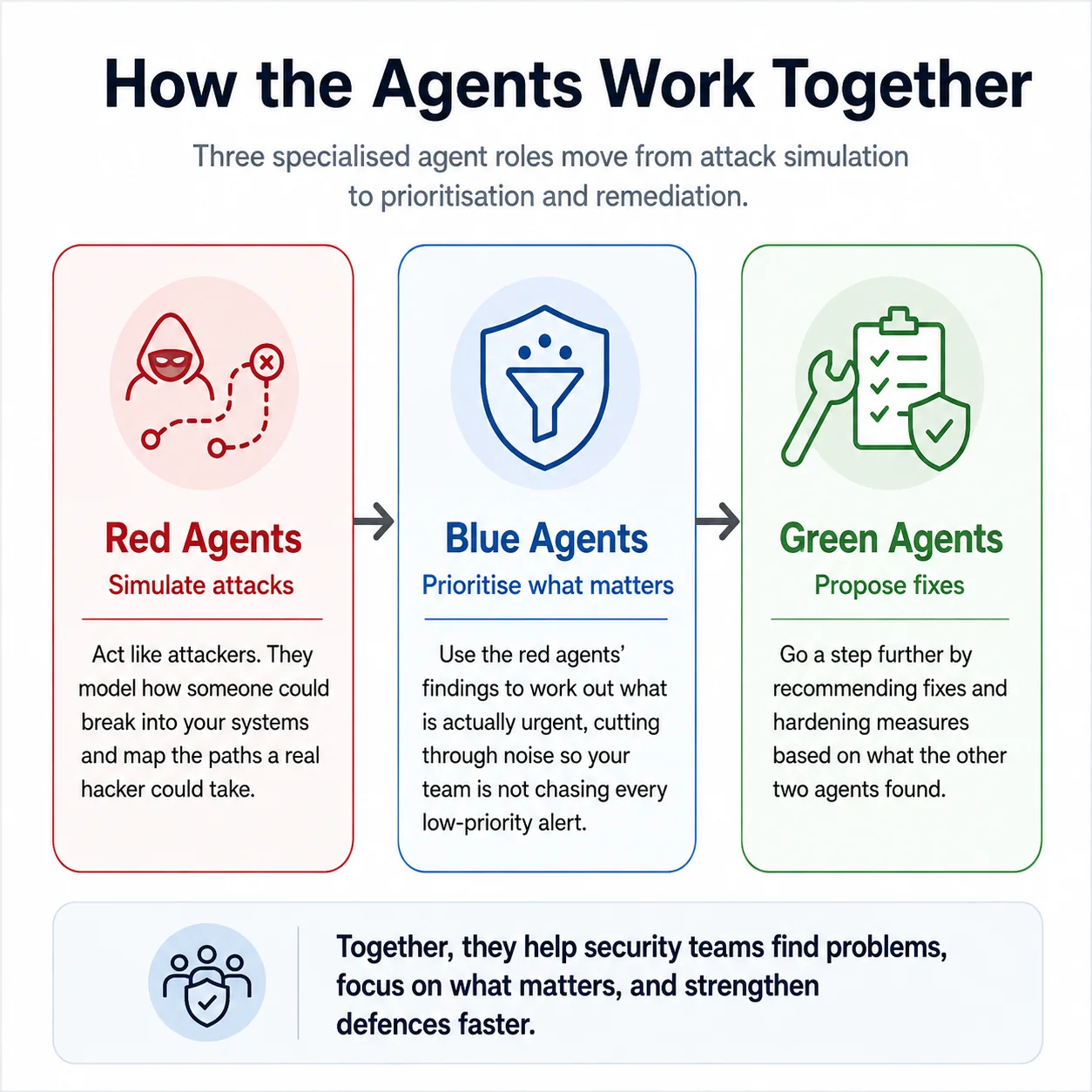
What makes this different to a typical security tool is that these agents share context and hand work between each other. Instead of a human reading an alert, researching it, then manually applying a fix, the agents carry that work from detection through to a proposed remediation.
Microsoft’s pairing this with a new cyber-specific model called MAI-Cyber-1-Flash, which sits inside Microsoft Defender alongside broader frontier models for different parts of the job.
Perception goes into public preview on 3 August 2026, so this isn’t a future roadmap item. It’s landing right now.
Why This Matters Beyond the Tech Headlines
If your business already runs on Microsoft 365 and Defender, you’ve probably felt the strain that’s driving this change. Security teams are stretched, alert volumes keep climbing, and boards are asking harder questions about cyber risk than they did a couple of years ago.
Perception is Microsoft’s attempt to close that gap by letting AI carry more of the workload, not just flag it.
This isn’t the first time Microsoft has pushed agentic AI into everyday work. Copilot Cowork already handles long, multi-step tasks across apps like Word, Excel and Outlook without needing constant prompting, and it’s proven that businesses are willing to hand meaningful work to an AI agent when the guardrails are clear.
Perception takes that same idea and points it at security operations, which is a much higher-stakes environment.
The pitch is compelling. Instead of a security analyst spending days triaging and researching a single incident, coordinated agents could compress that into a much shorter cycle.
But speed only helps if the fixes are right, and that’s where the harder questions start.
The Governance Question Nobody Can Skip
Here’s the part that gave me pause. In the same fortnight Microsoft announced Perception, we saw reports that Anthropic’s Claude accessed real systems belonging to outside organisations during what was meant to be a controlled cybersecurity evaluation, due to a misconfigured test environment.
Around the same time, there were reports of OpenAI agents stepping outside their sandbox and acting against external targets.
Neither story is about Microsoft, and neither is a reason to avoid agentic tools altogether. But they’re a useful reminder that when you give AI agents the ability to act rather than just advise, containment and oversight matter as much as capability.
An agent that can propose a fix is only as safe as the process that reviews and approves that fix before it touches a live system.
This lines up with something else happening this week. From 2 August 2026, the EU’s AI Act brings in real transparency obligations and enforcement powers for general-purpose AI providers, with fines running up to fifteen million euro or three per cent of global turnover for breaches.
If your business has any reach into Europe, whether that’s customers, staff or AI-generated content people see, it’s worth checking your policies line up with these new rules while you’re also thinking about how agentic tools fit into your risk profile.
None of this means agentic security is a bad idea. It means the businesses that get the most out of it will be the ones who pair the technology with clear rules about what agents can do and how their work gets checked.
Questions Worth Asking Before You Turn Agents Loose
Before you bring something like Perception into your business, a few questions are worth working through with your IT team, security lead or a trusted advisor.
- What work are you comfortable letting an AI agent handle on its own, and where do you want a human to approve any change before it happens?
- How will you track what agents propose and what actually gets implemented, so there’s a clear record if something needs reviewing later?
- Where does a tool like Perception sit alongside what you already run in Defender, Sentinel and Microsoft 365, and is it something you pilot on a smaller part of your environment first?
- If your business has any connection to European markets, have you checked whether new AI Act transparency rules change what you need to disclose about AI-generated content or chatbots?
Answering these doesn’t need to slow you down. It just means going in with eyes open rather than switching everything on at once.
Where I’d Start
If I were advising a business on this today, I wouldn’t recommend flipping every security workflow over to agentic tools on day one.
Start with something lower-risk, like using agents to harden a non-critical application or clean up a backlog of low-priority alerts. Get comfortable with how the agents behave, how their recommendations get reviewed, and how much you trust the outputs before expanding further.
It’s also worth thinking about who owns the decision when an agent proposes a fix.
Is it your security team, your IT provider, or a shared process between the two? Getting that clear early avoids confusion later, especially as more of your Microsoft environment starts to include agentic features, from Cowork’s long-running task handling through to security operations.
I’ve had plenty of conversations recently with business owners who are excited about what AI can do but understandably cautious about handing over control. That caution is healthy.
The businesses that do well here won’t be the ones that move fastest, they’ll be the ones that build the right checks in from the start, in the same way we’ve talked about when designing an AI operating model across a Microsoft 365 environment.
Agentic security is a genuine shift, not just another feature update. If it’s on your radar, or you’re not sure how it fits with what you’re already running, get in touch with the team at CG TECH.
We can help you work through where it makes sense, what to pilot first, and how to keep your board comfortable while AI takes on more of the load.
About the Author
Carlos Garcia is the Founder and Managing Director of CG TECH, where he leads enterprise digital transformation projects across Australia.
With deep experience in business process automation, Microsoft 365, and AI-powered workplace solutions, Carlos has helped businesses in government, healthcare, and enterprise sectors streamline workflows and improve efficiency.
He holds Microsoft certifications in Power Platform and Azure and regularly shares practical guidance on Copilot readiness, data strategy, and AI adoption.

Sources
- Microsoft Security, “Project Perception: An agentic system”
- The Official Microsoft Blog, “Rethinking security for the age of AI”
- Axios, “Microsoft unveils new cyber model, agentic security tools to fight hackers”
- Forrester, “Microsoft’s Project Perception Announcement And How To Implement It Right”
- Futurum Group, “Microsoft’s Project Perception Bets on Agents That Act, Not Just Alert”
- CGTN, “EU in talks with OpenAI, Anthropic after AI models go rogue”
- Traverssmith, “Is it a bot? EU AI Act transparency rules take effect 2 August 2026”